Unlock Lead Insights with Google Analytics


Understanding how visitors interact with your real estate website is crucial for success. When a potential client fills out a form, they're not just a visitor anymore; they're a valuable lead. Tracking these key events, or conversions, helps you measure your website's effectiveness and optimize your marketing strategies. With an iHouse Elite website and Google Analytics 4 (GA4), you have a powerful combination to gain these critical insights.
This guide will walk you through setting up key events / conversion tracking in GA4 for your iHouse Elite website. By correctly configuring your account, you can see exactly which marketing efforts are generating leads, allowing you to make data-driven decisions that grow your business. We'll cover how to define a lead capture event and turn it into a trackable key event / conversion, giving you a clear view of your website's performance.
Why Tracking Key Events / Conversions in GA4 Matters
Before we dive into the setup, let's clarify why this is so important. Google Analytics 4 is the latest version of Google's analytics platform, operating on an event-based model. Unlike its predecessor, which tracked "Goals," GA4 tracks “Key Events” or "Conversions." These are simply user interactions that you, the website owner, define as valuable to your business.
For real estate agents, the most valuable interaction is typically a new lead. By setting up a key event for lead captures on your iHouse Elite site, you can:
- Measure ROI: Directly attribute leads to specific marketing channels like Google Ads, social media, or your blog.
- Optimize Your Site: Identify which pages and calls-to-action are most effective at generating leads and which ones need improvement.
- Enhance Ad Campaigns: Import your conversion data into Google Ads to leverage smart bidding strategies that target users more likely to convert.
- Understand Client Behavior: Gain a deeper understanding of the path users take on your site before they decide to contact you.
Your iHouse Elite website is already configured to send a specific event to Google Analytics whenever a lead is captured. Our task is to tell GA4 that this particular event is a key event we want to track.
Step-by-Step Guide to Setting Up Lead Conversions
Setting this up is straightforward. First, ensure you have connected your Google Analytics 4 property to your iHouse website. You can find your GA4 Measurement ID (which starts with "G-") in your GA4 account under Admin > Data Streams. You can then add this ID in your iHouse Admin Menu to enable tracking via Admin Menu > SEO > Google Analytics. For a complete walkthrough check out our Google Analytics Tutorial: Click Here
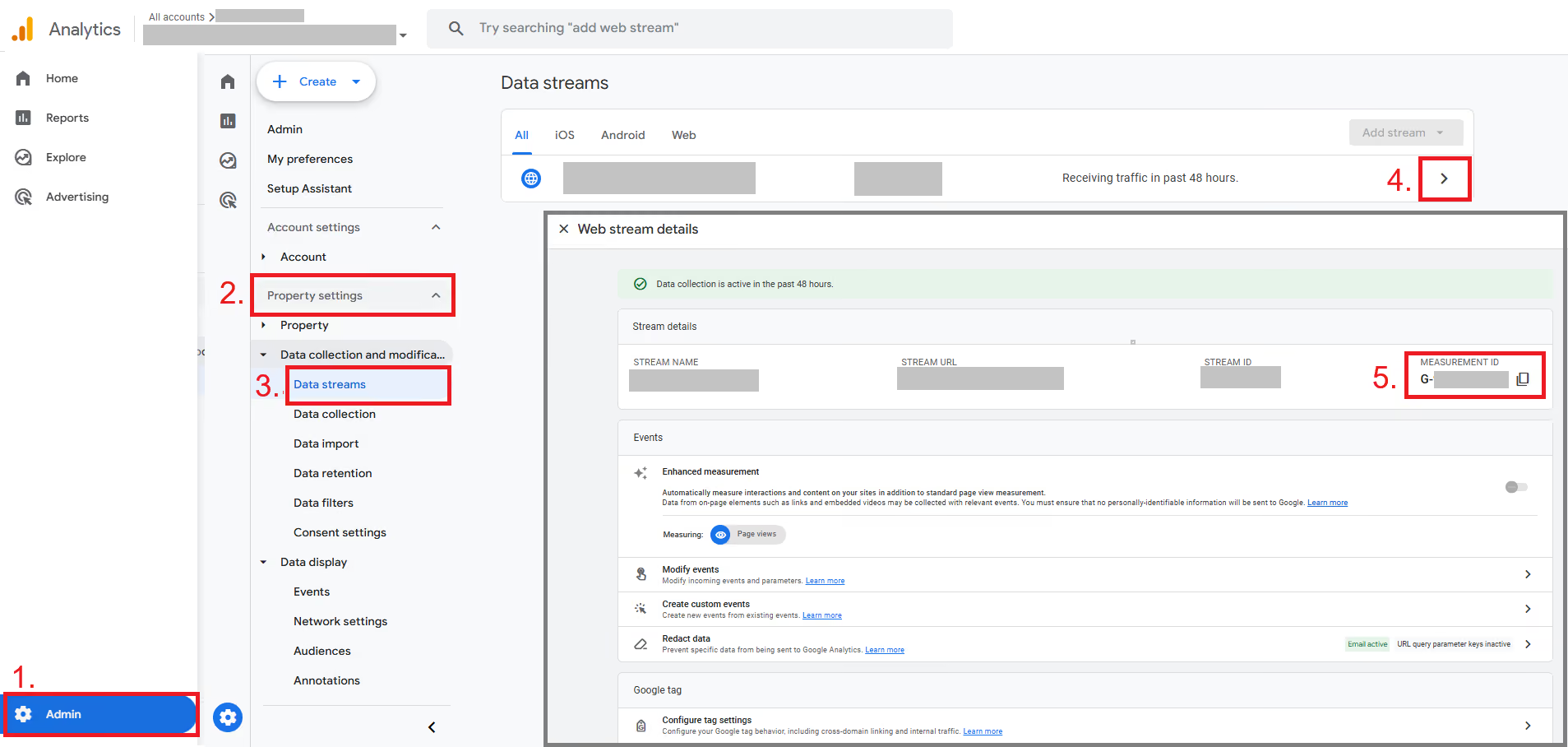
Once connected, follow these steps to configure your lead capture key event / conversion.
Step 1: Navigate to Your GA4 Admin Panel
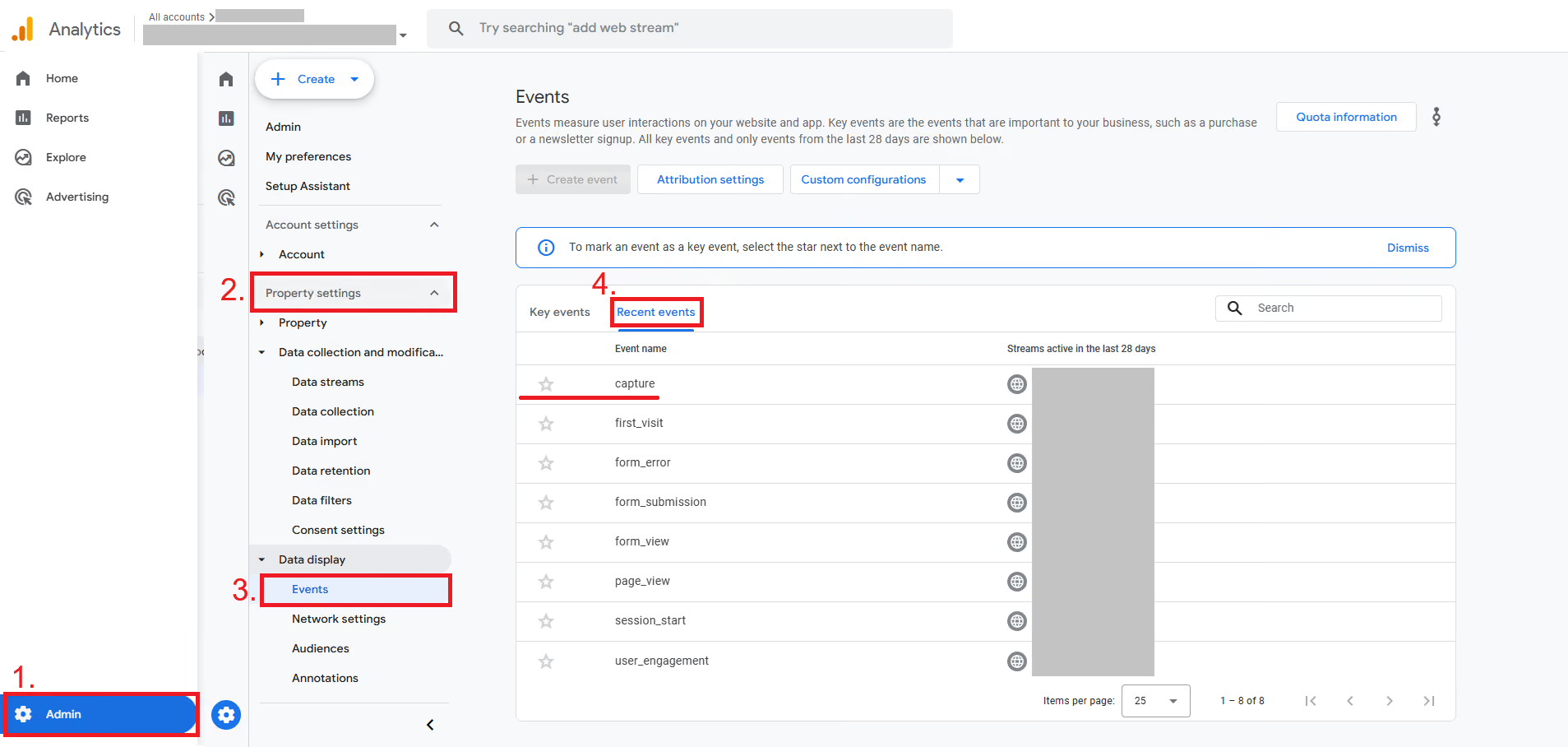
Similar to the earlier step of finding your GA4 Measurement ID, Log in to your Google Analytics account. In the bottom-left corner, click on the Admin gear icon. This will take you to the administration panel for your account and property. Make sure you have the correct GA4 Property selected.
Step 2: Access the Events Menu
In the Property column, look for the Data display section and click on Events. This page lists all the events that GA4 is automatically collecting from your website, as well as any custom events you have configured. You may need to wait up to 24 hours after connecting your site for data to start appearing here.
Your iHouse Elite website automatically sends an event with the following parameters when a lead is captured:
- Event Name: capture
This is the key interaction we want to track.
Step 3: Mark the Event as a Key Event
On the Events page, you will see a table of existing event names. Find the capture event in this list. To the far left of that row, you will see a star under the column titled "Key Events."
Click the Star. It will turn yellow, indicating that GA4 will now treat every instance of the capture event as a Key Event (formerly ‘conversion’).
That’s it! The process is simpler in GA4 compared to the older Universal Analytics. You don't need to manually define event categories or actions. By simply flagging the pre-configured capture event, you have successfully set up your primary key event / conversion.
Verifying Your New Key Event / Conversion
How do you know it's working? GA4 provides tools to verify your setup
You can check the standard reports. Navigate to Reports > Engagement > Events
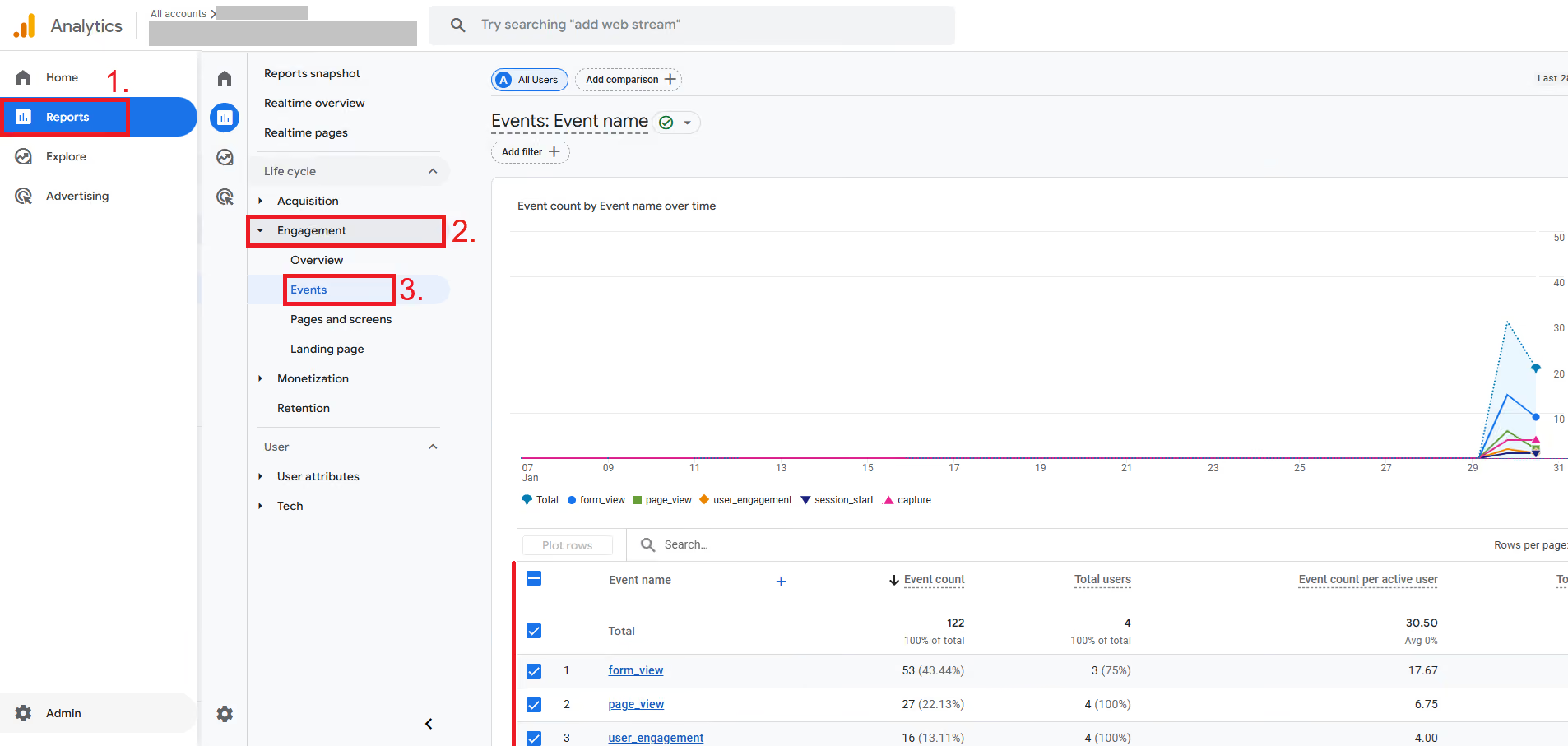
To test this:
- Submit a Test Lead: Open your website in a new browser window (using incognito or a private window is a good practice to simulate a new user). Navigate to any contact form on your site, such as a property inquiry or a general contact form.
- Fill Out and Submit the Form: Complete the form with test information and submit it.
- Within 24-48 hours, you will start to see data for capture populating this report as new leads come in through your website.
Taking Your Analytics to the Next Level
Setting up key event / conversion tracking is the foundational step. Now you can use this data to make smarter decisions.
- Analyze Acquisition Reports: Go to Reports > Acquisition > User acquisition or Traffic acquisition. Change the ‘First user primary channel group (Default Channel Group)’ to "First user source / medium" to see which channels are driving the most conversions. Are your leads coming from organic search (google / organic), paid ads (google / cpc), or social media?
- Create Custom Reports: Use the Explore section in GA4 to build custom funnels and path explorations. This can help you visualize the steps users take before submitting a form. Do they look at multiple listings first? Do they visit your "About Me" page? These insights are invaluable for optimizing the user journey.
- Link with Google Ads: If you run paid advertising, linking your GA4 property to Google Ads is essential. This allows you to import your capture key event / conversion into your ad campaigns. Doing so enables performance-based bidding strategies, which can automatically optimize your ad spend to get you more leads for your budget.
By tracking lead captures as key events / conversions, you transform your iHouse Elite website from a digital brochure into a measurable lead-generation machine. This simple setup provides the clarity needed to refine your marketing, understand your audience, and ultimately, close more deals. Start tracking today and unlock the full potential of your online presence.
demo and let's discuss how iHouse Elite can help your real estate business.